From Pocket Calculators to On-Device AI
From pocket calculators to on-device AI, trace how personal hardware evolved from fixed-purpose arithmetic to specialized machine-learning features.
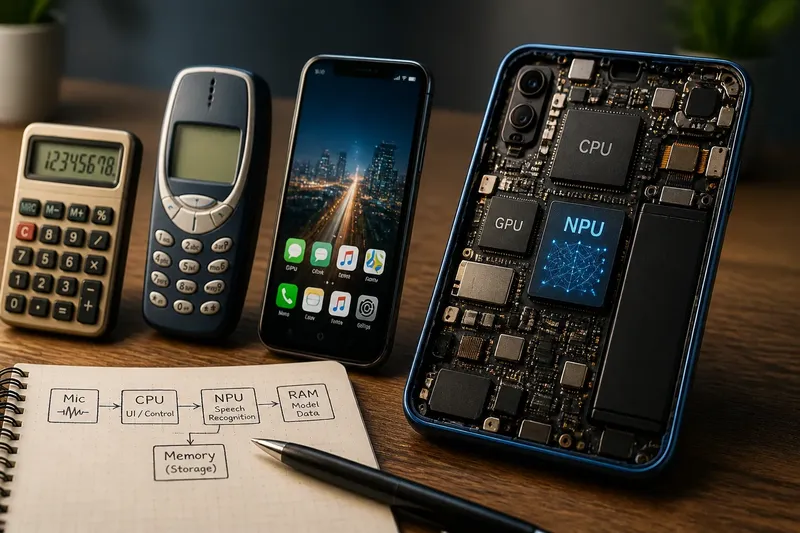
The common mistake in tracing on-device AI is to treat it as a software story and overlook the changing shape of personal hardware. The route from pocket calculators to on-device AI runs through a design question: how much computing can a small, battery-powered object support, and which jobs deserve that space?
Pocket calculators made a narrow tool portable
A pocket calculator brought arithmetic to a counter, classroom, or workshop bench. Its purpose was specific, and its buttons and display were designed around that purpose. People did not need to understand its internal circuits to use it; they needed a compact tool that could perform familiar operations where the work happened.
That focus kept the design bounded. The calculator needed electronic components, a power source, input buttons, and a display, all inside a small case. Its story is not that every later device copied it. Rather, it showed how a carefully limited computing task could become useful in a form people could carry.
Phones combined separate personal tools
Later handheld devices gathered jobs that had once belonged to different objects. A phone could store contacts, play music, show maps, and run applications. Unlike a calculator, it had to support many kinds of software, yet still fit in a pocket and remain usable throughout ordinary routines.
Several changes in hardware made that combination possible. Integrated circuits brought more functions into compact packages. Flash storage retained software and files without a mechanical disk. Denser memory gave applications space for active work, while wireless connections linked devices to services and other computers.
This was not a clean transition from one kind of computing to another. Personal devices grew more capable through layers of design choices: what to keep in the device, what components to combine, and which jobs to leave to other machines.
Mobile processors split work across specialized components
A phone’s processor shares a compact enclosure with a battery, display, camera, and other heat-producing parts. That makes mobile chip design a matter of balancing capability with energy use and thermal limits, rather than simply shrinking a desktop processor.
Many phones use a system-on-chip, which brings several processing components together. A CPU handles flexible, general-purpose tasks. A graphics processor is suited to work that can be divided into many parallel operations. A neural-processing unit or similar accelerator can handle certain machine-learning operations.
One camera feature might involve several of these components. The CPU can manage the interface, an image processor can adjust the photograph, and a machine-learning accelerator can run a supported recognition task. The user sees one feature; the device assigns its pieces to hardware suited to them.
An accelerator does not make every AI feature possible by itself. Software has to support the component, and the task must fit the available memory and power budget. Hardware opens design options; application developers still decide how to use them.
Memory and storage set different boundaries
Memory and storage are easy to confuse. Memory holds instructions and information an application is actively using. Storage keeps applications and files available after the device is no longer working on them.
A machine-learning task may need room for its model, the current input, intermediate calculations, and the operating system. If these compete for limited memory, the feature may run slowly, close other tasks, or fail to start. A model’s stored size alone does not describe the full demand.
Storage gives manufacturers choices about which software and supporting files to include. More room does not mean every model belongs on every device. The relevant question is what a specific product supports, not whether its storage seems ample in the abstract.
What can device history explain about on-device AI?
Why did personal devices move beyond fixed-purpose tools?
Compact components, improved memory and storage, and more capable processors let designers combine different functions in one object. Each addition still had to fit the device’s physical and software constraints.
What does a neural-processing unit do?
It accelerates certain machine-learning operations when the software is built to use it. Its presence does not tell you which features a manufacturer has enabled or how an application is implemented.
Why can the same feature differ across phone models?
Models can have different chips, memory configurations, and software support. Check the manufacturer’s description for the exact model and feature rather than relying on a processor family name alone.
A worked example shows how design choices add up
Imagine a fictional phone designer preparing a voice-note feature for a compact device. The starting inputs are a recorded note, a speech-recognition model, the phone’s available memory, and a chip with a machine-learning accelerator. The designer first checks whether the model and the note can fit alongside the operating system’s active work. If they fit, the software can send recognition operations to the accelerator; if they do not, the designer must choose a smaller model or a different workflow.
Next, the designer checks whether the accelerator supports the operations the model needs. If it does, the feature can use that component; if it does not, the software can try a general-purpose processor, with the tradeoff of greater demand on the device. The designer then checks whether the phone can finish processing without disrupting other active tasks. If it can, the feature keeps the full workflow on the device; if not, the feature needs a revised workload or a clearly disclosed alternative. The resulting decision is not “AI or no AI,” but which version of the task the particular hardware can support.
How should you judge a feature on a specific device?
- Check the manufacturer’s feature page for your exact model. If the feature is listed, compare its stated requirements with your device; if it is not, ask the manufacturer before assuming support.
- Check whether the app names a required chip or operating-system version. If your device meets the stated requirement, proceed to the app’s setup details; if it does not, choose a supported device or feature.
- Check the app’s storage requirements and whether it offers optional model files. If the needed files fit, install them; if they do not, remove unneeded files or use a supported alternative.
- Check whether the feature description distinguishes on-device processing from other components. If it explains the workflow, use that detail to decide whether it suits your task; if not, seek clarification from the app provider.
- Check the product’s privacy information for the input the feature handles. If the stated data practices fit your needs, use the feature accordingly; if they do not, avoid entering sensitive material or choose another method.
- Check the app’s help page for setup dependencies such as language files or model downloads. If the required items are available, install them before use; if they are unavailable, select a supported language or another tool.
Small devices grew through choices, not a single leap
Personal computing expanded as components became compact enough to combine, memory and storage supported richer software, and specialized chips took on selected workloads. Those changes did not remove physical limits. They gave designers more ways to decide what a device should do.
That history helps make sense of on-device AI today. The phrase describes neither one standard feature nor one class of device. It points to a design choice shaped by the model, the software, and the hardware working together.
When comparing a feature, look for the precise model and task it supports, then check its stated requirements and data handling. The useful question is not whether a device has crossed some universal threshold of intelligence, but whether its particular design fits the job you want it to do.